
This is useful when setting up or testing the platform, as it ensures that users do not receive emails before you are ready to begin onboarding or training.
When the setting is enabled, system emails such as welcome emails, training notifications, reminders, and Security Culture surveys are not sent to users.
The setting applies to the entire account and affects all products.
Admin emails are not affected.
Where to find the setting
To turn system emails on or off:
- Go to the sidebar
- Click on Account
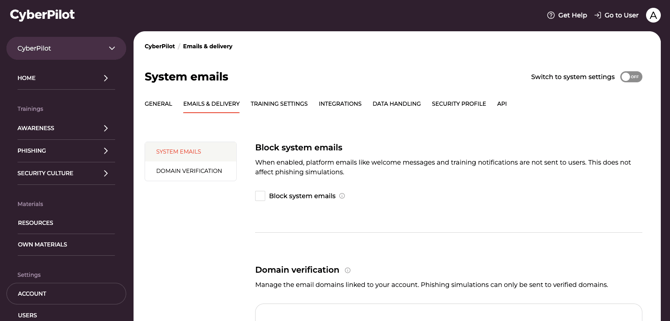
- Open the Emails and delivery tab
Here you will find the Block system emails setting.
- Turn the setting ON to block system emails for end users
- Turn the setting OFF to allow end users to receive system emails
This setting controls whether users receive emails such as welcome emails, training notifications, reminders, and Security Culture surveys.
Default behaviour
All new CyberPilot accounts start with system emails blocked.
This allows administrators to:
-
Add users
-
Assign training
-
Configure the platform
-
Test features
...without sending emails to real users.
When you are ready to start onboarding your organization, you can enable system emails.
When system emails are blocked
When Block system emails is ON, end users will not receive system emails.
This includes emails such as:
-
Welcome emails
-
Training enrollment notifications
-
Training availability emails
-
Training reminders
-
Security Culture survey invitations and reminders
-
User reactivation emails
Administrators can still create users, assign training, and configure the platform as normal. Users simply will not receive email notifications.
What happens when you enable system emails
When the Block system emails setting is turned OFF, system emails are allowed.
Here is what will happen when you enable system emails:
-
Welcome emails are only sent once a user has a qualifying event after system emails are turned on. That is either their first training enrollment, or (if you use Automated follow-up for phishing) their first phishing simulation result becoming available. Events that happened while system emails were blocked don't count. For example, if a user was enrolled while blocked and is enrolled again after unblocking, the later enrollment triggers the welcome email.
- Each user receives a welcome email at most once, whichever of the two triggers happens first.
-
Training notifications, reminders, and Security Culture emails only send for enrollments and events that happen after system emails are turned on.
-
This prevents users from receiving emails tied to enrollments made while admins were testing or setting up the platform.
ℹ️ Creating or uploading users does not send emails by itself.
Users only receive their welcome email once they're enrolled in training or, if you use Automated follow-up, when their first phishing result is ready. This means you can safely add or upload users before assigning training, without triggering emails to end users.
If you only use Phishing Training
Block system emails is turned on by default for every new account, including accounts that only use Phishing Training. You can turn it off under Account → Emails and delivery, just like any other account.
Phishing simulations are always sent as scheduled and are never affected by this setting.
Why turn it off? The setting matters if you want to use Automated follow-up. With Automated follow-up, employees receive a welcome email (giving them access to their learning portal) and a notification when their phishing result is ready. Both are system emails, so they're only sent once Block system emails is turned off.
Automated follow-up is a separate toggle under Account → Training settings → Phishing. While system emails are blocked, it's greyed out. Once you turn off Block system emails, you can switch it on.
If you turn Block system emails back on later, Automated follow-up is greyed out again but keeps its setting. It starts working again as soon as system emails are unblocked.
While system emails are blocked, you'll see a banner on the Phishing analytics, Phishing planner and Campaigns pages linking to the setting.
Summary
The Block system emails setting controls when your end users start receiving automated communication from CyberPilot.
Key points:
-
The setting applies to the entire account
-
It blocks all system emails (e.g., welcome emails, training notifications, and culture surveys) to end users
-
Admin emails are never blocked
-
All accounts start with emails blocked
- Phishing-only accounts can turn system emails on too. This is needed for Automated follow-up to reach employees.
Users are only emailed once they're enrolled in training or receive their first phishing result through Automated follow-up. So you can safely create or upload users without triggering emails.
This ensures that emails are only sent when your organization is ready to begin onboarding and training users.