
The Data Handling section (found under Account → Data Handling) allows administrators to manage these choices. It provides transparency around how the platform processes data and gives you control over key data-related settings.
Why is Data Handling important?
The Data Handling section is designed to:
-
Give you greater control over how your organization’s data is processed
-
Provide transparency around what information is collected and why
-
Support organizations with internal compliance and privacy requirements
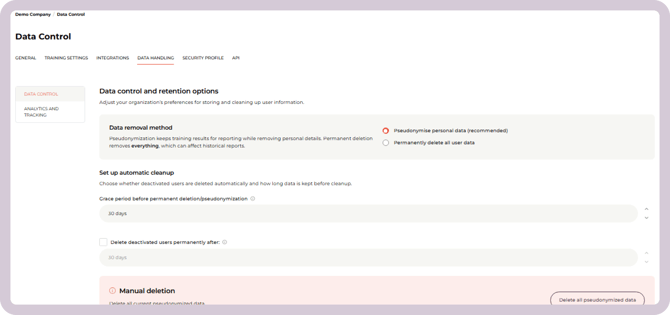
As CyberPilot continues to evolve, more data-related settings may be added here, ensuring you always have the clarity and control you need.
What does Data Handling include?
The Data Handling section gathers settings related to how CyberPilot processes and manages certain types of data.
Currently, this includes two areas.
Analytics & Tracking
This setting controls whether CyberPilot can collect anonymised user interaction data, such as:
-
Clicks
-
Navigation patterns
-
Session recordings
This information helps us identify usability issues and improve the overall user experience on the platform.
Managing user data when someone leaves
This group of settings controls what should happen to personal data when a user leaves your organization or is removed from the platform.
You can decide:
-
Whether personal data should be pseudonymized or permanently deleted
-
How long CyberPilot should wait before removing the data
-
Whether inactive users should be cleaned up automatically
These options help organizations balance privacy requirements with the need to maintain accurate reporting.
Why might some options be disabled?
You may see that the Analytics & Tracking toggle is disabled or greyed out.
This is intentional. CyberPilot is currently updating its Data Processing Agreement (DPA) to reflect these new data controls.
Until this update is completed, the setting may be visible but not yet changeable for all accounts.
How user data is handled when someone leaves
When a user leaves your organization, you can choose how their data should be handled in CyberPilot.
There are two options.
1: Pseudonymize personal data (Default)
This is the recommended default option.
When a user is pseudonymized:
-
Personal information such as name, email, and job title is removed
-
Training results and activity data remain in a non-identifiable form
This allows historical reports to remain accurate while ensuring that the user can no longer be identified.
Example
If a user completed a training with a score of 75%, the report will still show that a user completed the training with that score, but the user’s identity is removed.
2: Permanently delete all user data
If this option is selected:
-
All personal data is deleted
-
Training activity and related data are also removed
This ensures complete removal of the user’s data from the platform.
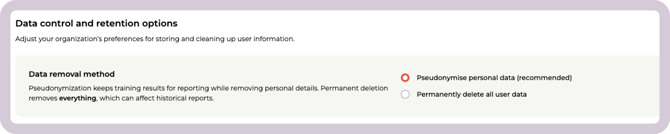
However, it may affect historical reports because past activity from that user will no longer be included.
What happens when a user is removed?
When a user is removed from CyberPilot - either by being deactivated or deleted - their data is not removed immediately.
Instead, CyberPilot waits for a configurable grace period before applying the selected data removal method.
This grace period gives administrators time to:
-
Reactivate the user if needed
-
Correct mistakes
-
Review user activity or data
After the grace period ends, CyberPilot will either pseudonymize or permanently delete the user’s data based on the selected setting.
Grace period before cleanup
The grace period defines how long CyberPilot waits before cleaning up user data.
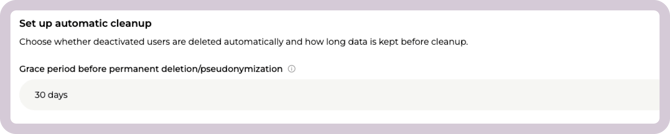
Default: 30 days
During this time, administrators can still:
-
Reactivate the user
-
Review user activity if needed
After the grace period ends, the selected data removal method is applied automatically
Automatic cleanup of inactive users
You can also decide whether inactive users should be cleaned up automatically.

If automatic cleanup is enabled:
-
Inactive users will enter the grace period after a defined number of days (default 30 days)
-
Their data will then be pseudonymized or permanently deleted according to your settings
If automatic cleanup is disabled (cleanup):
-
Inactive users remain on the platform indefinitely
-
Cleanup only happens if the user is manually deleted
Manual deletion of pseudonymized data
Administrators can also permanently remove pseudonymized data manually.
The Delete all pseudonymized data button allows you to remove anonymized training records that remain in the platform.

This action:
-
Permanently deletes the remaining pseudonymized data
-
Cannot be undone
-
May change historical reports
What personal data is removed?
When a user’s data is pseudonymized or permanently deleted, the following personal information is removed:
-
Name
-
Email
-
Country
-
Job title
-
Phone number
-
Office location
This ensures the individual can no longer be identified within the platform.
How reporting is affected
Pseudonymization (default)
When data is pseudonymized:
-
Personal information is removed
-
Training results remain in reports
-
Historical reporting stays accurate
The activity remains visible in reports but cannot be linked to a specific person.
Permanent deletion
When permanent deletion is selected:
-
Both personal data and training data are removed
-
Historical reports may change or show gaps
For example, if a user completed a course and their data is later deleted, that completion will no longer appear in the historical report.
Summary
The Data Handling section allows administrators to control how user data is managed when employees leave the organization.
Key points:
-
The settings apply to the entire account
-
Analytics & Tracking controls whether platform interaction data can be collected
-
User data is not removed immediately when a user leaves
-
A grace period is applied before data cleanup occurs
-
Personal data can be pseudonymized (default) or permanently deleted
-
Pseudonymization removes identifiable information while preserving reporting accuracy
These controls help organizations balance privacy requirements, compliance, and accurate security reporting on the CyberPilot platform.