
The task list guides you through the most important steps for getting your organization ready to use CyberPilot. It shows you what to do, in what order, and highlights which steps are essential before going live.
What the task list is
The task list is a checklist that appears on your Home dashboard when you first get access to CyberPilot. Each task links directly to the relevant part of the platform so you can complete it in a few clicks.
Tasks are kept up to date by CyberPilot, so the list always reflects the current recommended setup flow.
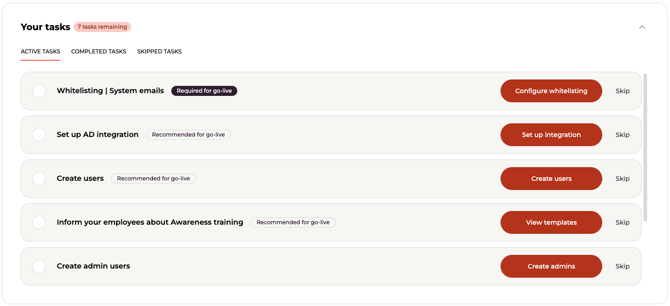
Task tags: Required vs. Recommended
Some tasks have a tag that signals how important they are before going live:
Required for go-live - This task needs to be completed before your account is ready for active use. If you go live without completing it, something may not work as expected.
Recommended for go-live — This is best practice, but not blocking. We encourage completing it before launch, but it won't prevent the platform from working.
Tasks without a tag are standard onboarding steps with no specific timing requirement.
Completing and skipping tasks
To mark a task as done, complete the action it describes and click Mark as complete on the task.
If a task isn't relevant to your setup right now, you can skip it. Skipped tasks can be restored later if you change your mind.
All admins in your account share the same task list and progress - if one admin completes a task, it's marked as done for everyone.
Email reminders for open tasks
If you have open tasks in your account, CyberPilot will send reminder emails to help keep your setup on track. The reminders work in two stages:
Stage 1 - Required tasks outstanding: As long as you have one or more "Required for go-live" tasks still open, you'll receive a reminder every 2 weeks listing only those tasks. This continues until all required tasks are completed.
Stage 2 - General open tasks: Once all required tasks are done, if you still have other open tasks, you'll receive a lighter reminder every 4 weeks with an overview of what's left.
When all tasks are complete, reminders stop automatically.
Turning off reminders
If you'd prefer not to receive these emails, you can disable them under Account → Email & Delivery → Email notifications for open tasks. This turns off both reminder types for your account.
Still have a questions?
Contact us at support@cyberpilot.io or reach out to your Customer Success Manager.