
The phishing catalogue gives you an overview of all phishing simulations available to use in the platform. It helps you explore campaign options, preview content, and choose simulations that fit your organization’s training goals.
The catalogue is especially useful when you’re planning your next phishing campaign and want to quickly understand what’s available.
When should you use the phishing catalogue?
The best time to use the phishing catalogue is when you’re planning your next phishing campaign.
It allows you to:
-
See all available phishing simulations in one place
-
Compare campaigns visually and by difficulty
-
Preview emails and landing pages before using them
-
Choose simulations that match your organization’s maturity and focus areas
How the phishing catalogue works
For each simulation, a card in the catalogue shows you the most important information at a glance.
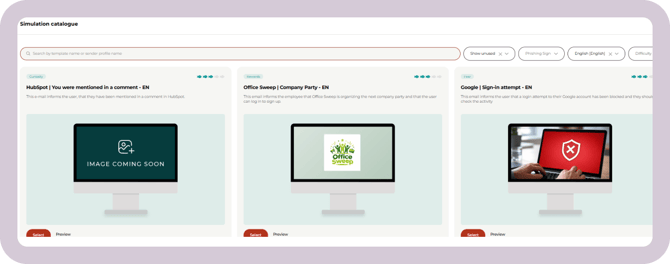
Each card shows:
- Phishing sign
Shows the phishing sign that is the most prevalent in the simulation. - Difficulty (fish rating)
Gives an indication of how challenging the simulation is for users. The difficulty is initially estimated, but over time it’s adjusted based on real performance data, so it reflects how the simulation compares to others in the catalogue. - Simulation name
Follows this format: [Descriptive name of the email] & [Sender profile name] - Short description
Explains the purpose or scenario of the simulation. - Thumbnail
A visual reference that makes simulations easier to recognize and compare.
Benchmark data
When you hover over a simulation card, the thumbnail is replaced with benchmark data to help you compare performance. If you’ve already used the simulation, its current status (draft, scheduled, or completed) is shown directly on the card.
Previewing a phishing simulation
Click Preview on a simulation card to see exactly what users will experience.
This includes:
- The phishing email itself
- The sender profile
- Any login or landing page
- The redirect page shown after interaction
The phishing simulation emails will be sent from a variety of domains we own.
Previewing helps ensure the content fits your organization, users, and timing before you use the simulation.
Watch this short video that shows you how to scroll through the catalogue:
Navigating and filtering the catalogue
By default, the catalogue shows simulations you haven’t used yet. This helps you focus on new campaigns when planning your next activity.
You can refine what you see using the available tools.
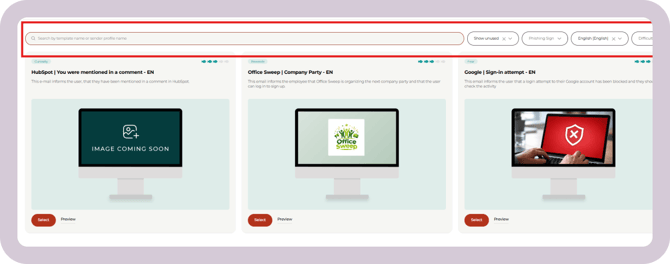
Filters can be combined to quickly narrow down the most relevant simulations.
Tips for choosing the right simulation
- Vary the phishing signs you use over time to expose users to different attack methods.
- Use difficulty as guidance, not a rule. More challenging simulations can help test mature users, while “easier” ones can help rebuild confidence if results have been poor.
If you’re unsure which simulations to choose, your customer success manager can help guide you.
Still have a question?
Contact us at support@cyberpilot.io