
As a default, CyberPilot training can be completed without any required score. This means that even getting 0% of answers correct is enough to complete a training.
You have the option to change this by setting a minimum score requirement. With this requirement, users will only be able to complete a training if they achieve the minimum score or higher.
How to set a minimum score requirement
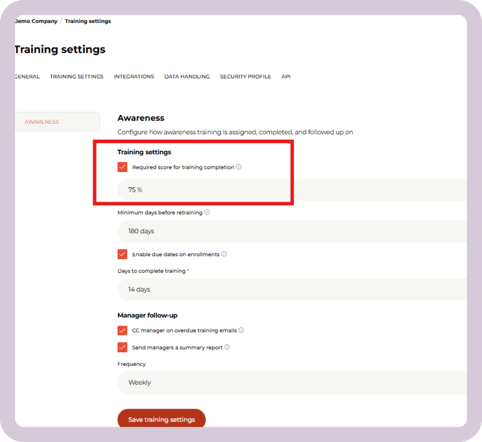
- Go to Account → Training Settings → Awareness → Required score for training completion.
- Check the box, Required score for training completion ON.
- Enter a number for the required score
- Click Save training settings.
How the minimum quiz score requirement works
Your users can retake the quiz as many times as they need until they achieve a passing score. The training can't be completed until the user has achieved the required score.
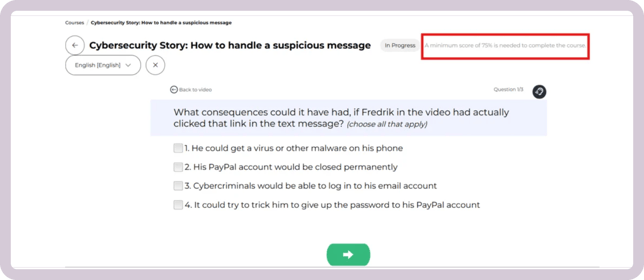
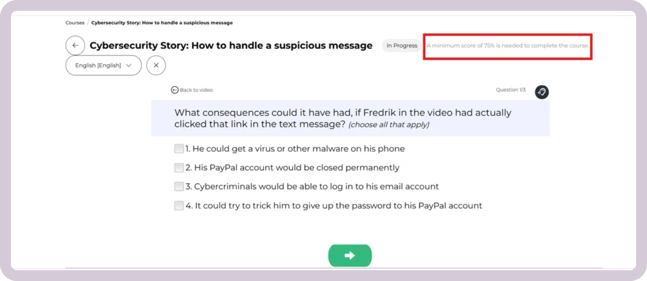
Your users will see the quiz score requirement in two places:
- At the top of the screen while they are taking the training:
- At the end of the training, if they did no pass:
Note: If you have your own content on the platform, the minimum quiz score will apply to it as well.
How to exempt content from the minimum quiz score requirement
If you have your own content on the CyberPilot App, you can exempt it from the minimum score requirement. Please note, you can only do this for your own training content - you can't turn off the required score for only some CyberPilot courses.
To exempt one of your own trainings from the minimum score requirement:
- Go to Content and select the training
- Go to the Content tab within the training
- Go to Content dates
- Toggle ON Exempt from minimum score requirement
Now, this training will not have a required score to pass.
Still have a question?
We're here to help: support@cyberpilot.io