
If you want to remove a training that was already sent out to your users, you need to unenroll it. You can unenroll a training at any time after it has been sent out, regardless of whether users have already completed it.
Here's how to unenroll a training:
- Under "Awareness" click on "Content"
- Find the training you want to unenroll and click on it
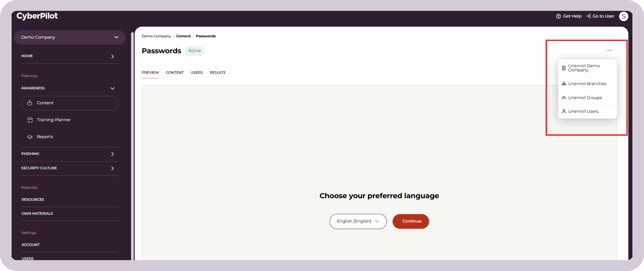
- In the right corner, click on the "..." to reveal the unenroll menu
- Click on who you want to unenroll the training from. You can unenroll it from groups, branches, or users.
- Confirm the unenrollment
The users will now be unenrolled from the training. This means it will no longer appear in their dashboard of complete or incomplete training.
What happens to reporting after unenrollment
Unenrolling an employee from training does not erase their history. Your reports keep showing the status that training was in at the point of unenrollment — for example, an employee who completed a course before being unenrolled still shows as "Completed" for that training. Reports also show who unenrolled the employee and when.
There's no need to export or download data before unenrolling someone to avoid losing it.
Still have a question?
Contact us at support@cyberpilot.io