
If you have enabled training due dates, you can also automatically cc a user's manager on overdue training reminder emails.
Another way to automatically notify managers of overdue training is the manager report, which is sent only to managers. You can read more about that here.
When you turn on the notify manager feature, a user's manager will be added to any overdue training reminder emails. This includes training assigned and/or overdue before the due dates or notify manager settings were turned on.
Here's how to do it:
- Go to Account → Training Settings → Awareness → Manager follow-up.
- Check the box, CC manager on overdue training emails ON.
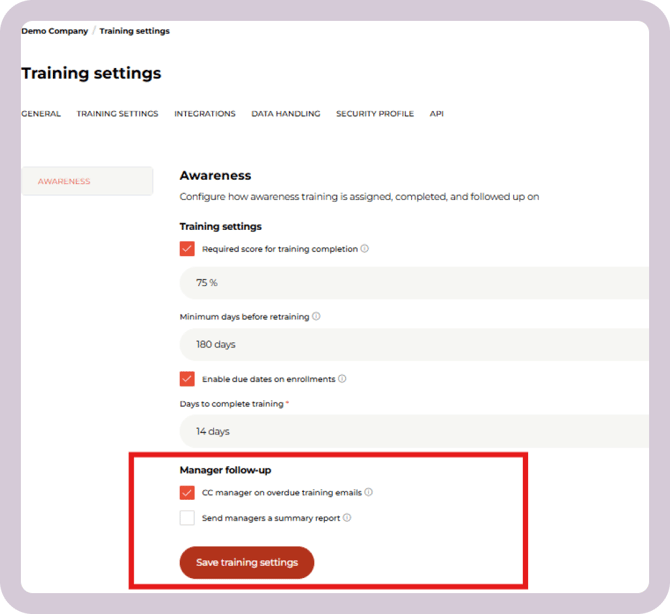
In order for it to work properly, you must:
- Enable due dates on enrollments
- Have the manager's email and name properties filled in for the user
There are three ways you can fill in the manager's information for each user:
In order to use the manager report, you must have the "Manager" and "Manager's email" properties filled in on for your users.
There are three ways you can fill in the manager's email for each user:
- If you use Microsoft Entra ID integration to sync your users to the CyberPilot App, make sure you have these properties filled in.
- You can't manually enter the properties if you use the Microsoft integration, because the manual entry will be replaced with the next sync.
- If you do not use Entra ID, the manager propertes can be filled in via Excel upload. See how to upload user data here.
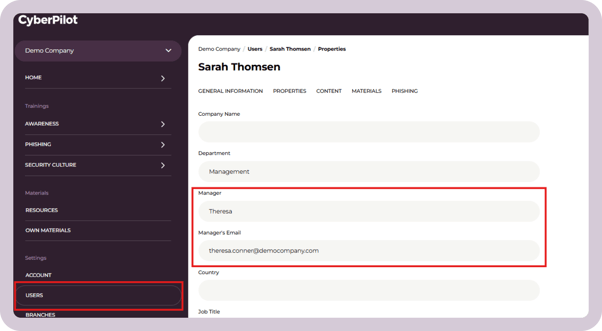
- You can manually fill in this data:
- Go to the user
- Click on "Properties"
- Fill in the manager's name
- Fill in the manager's email
- Click "Save"
We recommend you use this setting to add an extra layer of accountability to the training.
By adding managers to reminder emails, you can easily elevate the reminder email and demonstrate to your users that the training is important - something the organization is keeping an eye on.
It raises issues for individual team managers and increases the training participation rate.
Some tips for communication
When you enable this feature, we recommend that you tell the managers in your organization that you're doing so. This will help avoid confusion when they suddenly start getting cc'd on emails about incomplete training.
You should also tell your users about it. That way you can set proper expectations and avoid employees feeling that they have "been told on" or ashamed. Let them know ahead of time that if they do not complete their training within a certain amount of days (we recommend 14 days), their manager will be notified.
Still have a question?
Contact us at support@cyberpilot.io