
Making sure users complete their training is an important part of administering Awareness Training.
CyberPilot offers two ways of automated training follow up that involves managers:
1. CC manager on overdue training notifications
You can read more about adding managers to reminder emails in this article.
| ⚙️ Function | Automatically cc managers on training reminder emails sent to users |
| 📆 Email frequency | Weekly |
| 👤 Audience | Users and managers |
| 🎯 Purpose |
User focused. It shows users that the training matters and that they are responsible for completing it. Copying their manager on the email adds a sense of accountability and reinforces that expectation. |
2. Manager report email
This is what we'll focus on for the remainder of this article.
| ⚙️ Function | Automatically send managers a summary report that lists which of their users have overdue training |
| 📆 Email frequency | Weekly or monthly |
| 👤 Audience | Managers only |
| 🎯 Purpose |
Manager focused. Helps managers get a quick overview of which of their users are not completing their training on time |
How the manager report email works
When the manager report feature is enabled, all managers in the account will receive an automated email weekly or monthly that lists their users with overdue training.
If you became a customer after March 2026, the feature is turned on for you by default with a weekly email frequency.
You can always edit the settings yourself using the steps below.
Manage the setting under Account → Training Settings → Awareness → Manager follow-up.
Here, you can enable or disable the emails. You can also set the frequency of the manager report email to weekly or monthly.
- Weekly emails are sent Monday mornings
- Monthly emails are sent on the first day of the month
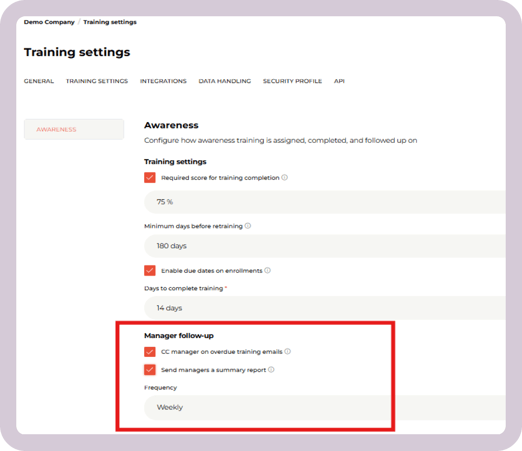
Note: It is not possible to enable the manager report feature for only some managers. When you enable the feature, it applies to all managers in the organization.
What the manager report email looks like
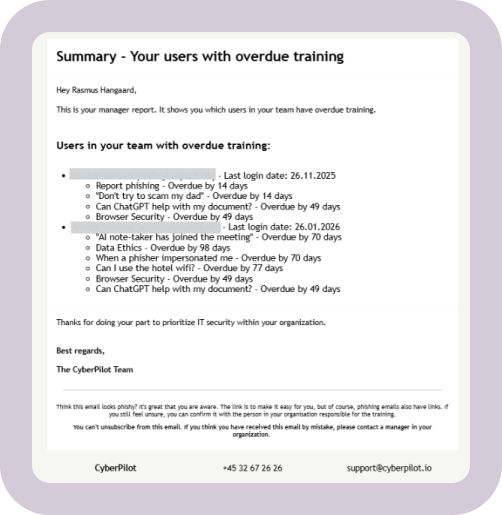
The manager report contains a list of each user with overdue training, what is overdue, and how long it is overdue by. Here is an example of how the email looks:
Requirements to use the manager report feature
All three of the following requirements must be met for the email to be sent.
1. Manager & Manager's email properties
In order to use the manager report, you must have the "Manager" and "Manager's email" properties filled in on for your users.
There are three ways you can fill in the manager's email for each user:
- If you use Microsoft Entra ID integration to sync your users to the CyberPilot App, make sure you have these properties filled in.
- You can't manually enter the properties if you use the Microsoft integration, because the manual entry will be replaced with the next sync.
- If you do not use Entra ID, the manager propertes can be filled in via Excel upload. See how to upload user data here.
- You can manually fill in this data:
- Go to the user
- Click on "Properties"
- Fill in the manager's name
- Fill in the manager's email
- Click "Save"
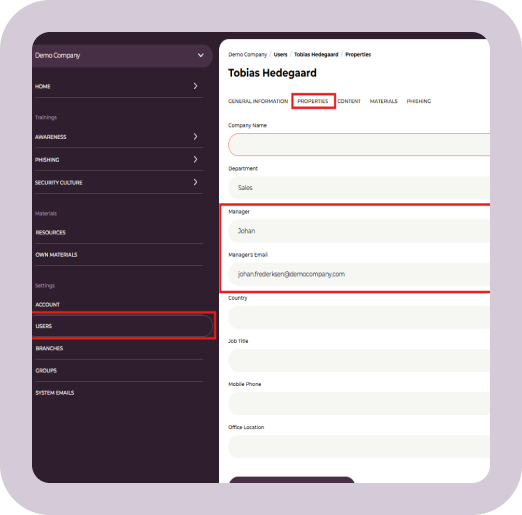
If a user's manager properties are not filled in, the email will not be sent.
It does not, e.g., go out to the account admin if the manager properties are not filleld in.
2. Due dates enabled for training
The email summarizes users with overdue training, so you must use the due dates feature for the manager report to work.
See how to enable due dates in this article.
3. The manager must be an active user in the CyberPilot App
In order to get the manager report email, the manger themselves must be an active user in the CyberPilot app.
-
If they are not a user, they will not get the email.
-
If their user is inactive, they will not get the email.
How the manager notification features work together
-
The cc manager feature adds the manager to weekly reminder emails sent to users with overdue training.
- The manager will continue to be copied on these emails, even if the manager report feature is enabled. That's because the purpose of this feature is to show users accountability by having their manager copied on their reminder emails.
- The manager report feature sends a weekly or monthly email to managers summarizing their users with overdue training.
- The manager report email can be sent regardless of whether the cc manage feature is on.
- If both features are on, the manager will get both types of emails.
Why use the Manager Report Email
The manager report email helps you stay on top of your team's training with minimal effort. Instead of manually checking who’s late with courses, users' managers get an automated summary that shows exactly which team members have overdue training and how long it’s overdue. This makes it much easier to:
- Spot delays and take action
- Reduce administrative burden of tracking training and following up
- Improve overall training completion rates
- Demonstrate clear follow-up and accountability processes
Which manager notification feature should you use?
We recommend you use both the cc manager feature and the manager report email feature in combination.
While the cc manager feature gives accountability to users, the manager report feature enables managers to quickly take action on users with overdue training.
Using the two features together reinforces the importance of the training across the entire organization.