
Content can be translated into additional languages using the in-app AI translator. Each language version can then be reviewed and adjusted as needed.
See an overview of languages supported here.
Important: PDFs, slide decks, and quizzes created directly in CyberPilot's content builder can be automatically translated through the platform.
SCORM packages and videos cannot be translated through the platform.
How to translate content
You can translate content whether you:
- Created your own content
- Cloned content
- Customized content with AI
- Or want to add an extra language to CyberPilot content
Note: CyberPilot’s original content cannot be translated directly. If you want to translate CyberPilot content, you must first create your own editable version, either by cloning it or customizing it with AI.
Step by step guide
Once you have an editable course, follow these steps:
- Open the content you want to translate
- Go to Translate
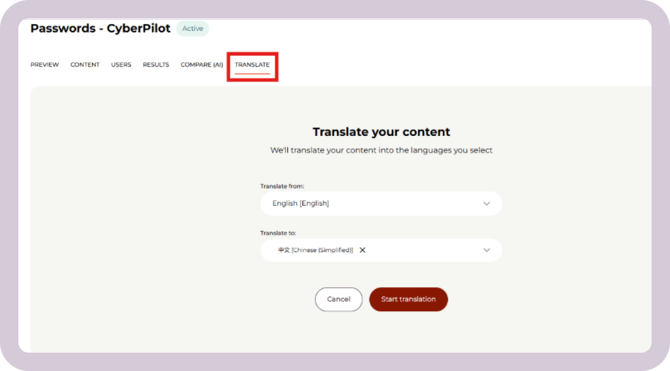
- Choose languages
- Select the source language to translate from
- Choose one or more target languages to translate to
- Start the translation
- Click Continue or wait here for the translation to complete.
- Do not edit the content while the translation is in progress, as any changes made during this time will not be included in the translations.
Note: Translations do not apply to videos.
When you clone or customize a course, the video is only available in the languages it has already been produced in.
-
If the video already exists in the language you are translating into, that version of the video will be used in your translated content with no changes made to the video.
-
If the video does not exist in the language you are translating into, the English version of the video will be used instead. The video will not be translated, but written course content will still be translated. Both you as an admin and your users will be notified when a video is being shown in English instead of the selected language.
You can see which languages a video is available in on the Content page of the original course.
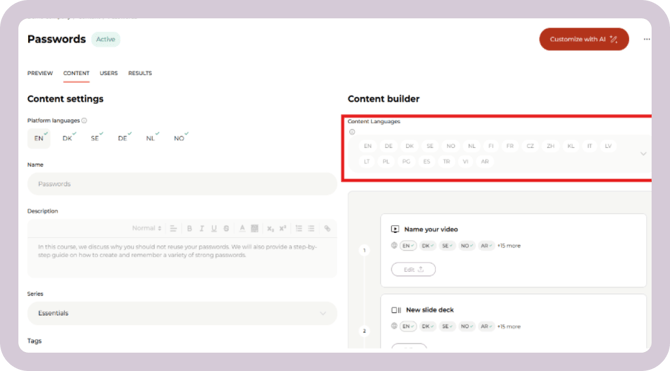
When you translate content that you created on/uploaded to the platform yourself, the video won't be translated. You can either upload a video in the target language, or the video shown to users will default to the original uploaded video.
Review and edit the translation
Once the translation is complete, you can:
- Preview the content and switch between languages
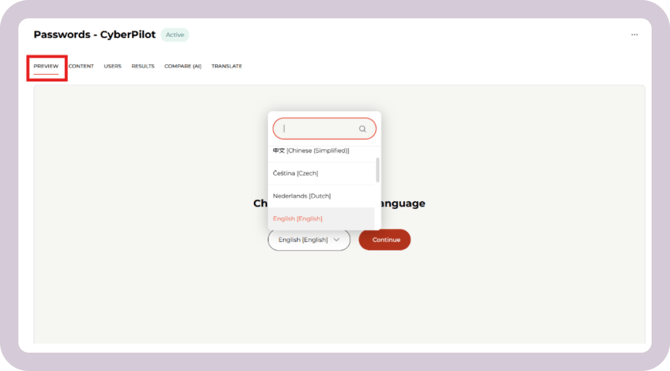
- Edit translated content in the Content Timeline
- Make adjustments to slides and quizzes as needed
- See this guide for how to edit slides and quizzes
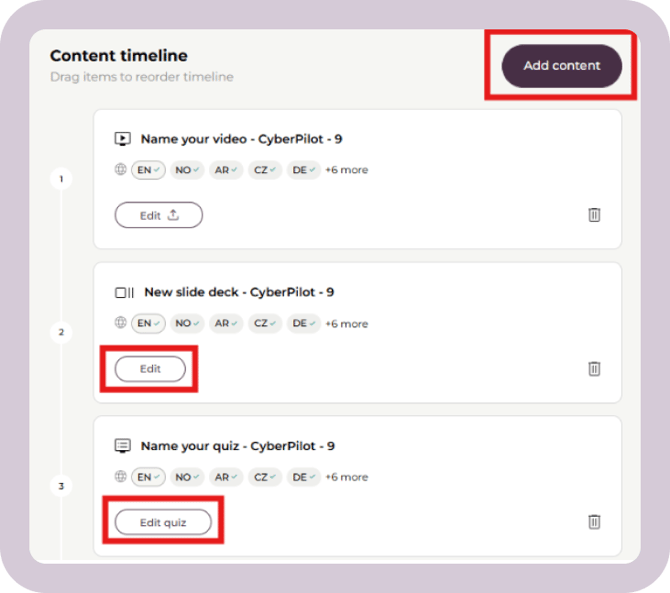
Note: if you make changes in one language, it will not automatically apply for other languages.
To keep all language versions aligned, you will need to retranslate the content or edit the other languages manually to apply these changes.
What happens when you retranslate content
If you retranslate a language that's already been translated, the AI translation overwrites that language's content to exactly match the current version of the source language.
This means:
- Any slides added, removed, reordered, or changed to a different template in the source language since the last translation will now be reflected correctly in the retranslated version.
- Any edits you made directly in the target language (for example, manual wording changes) will be overwritten and replaced by the new translation.
To keep a manual edit in a translated language instead of losing it to a retranslation, make the same change directly in that language rather than retranslating from the source.