
In many countries, employees are waiting to choose their Christmas gift from work right now. Criminals know this. When we sent simulated phishing emails about gift selection in October, up to 37% clicked the link – three times as many as in an average phishing simulation.
At the same time, AI is making fake emails harder to spot. Here is the data, an example of one of the emails, and what both employees and companies can do about it.
The numbers: 37% clicked, 10% entered their details
In October, we sent two simulated emails, "Choose your Christmas gift" and "Your Christmas gift is sold out", to 62,188 employees at our customers.
|
Christmas gift email |
Average phishing simulation |
|
|---|---|---|
|
Clicked the link |
Up to 37% |
Approx. 12% |
|
Entered details on the fake page |
10% |
Approx. 5% |
We send phishing simulations to more than 250,000 employees at over 1,000 companies. No data entered during the simulations was stored. For more numbers, read Data from +500,000 phishing simulations or what happened with our Easter phishing campaign offering free chocolate.
What the email looked like
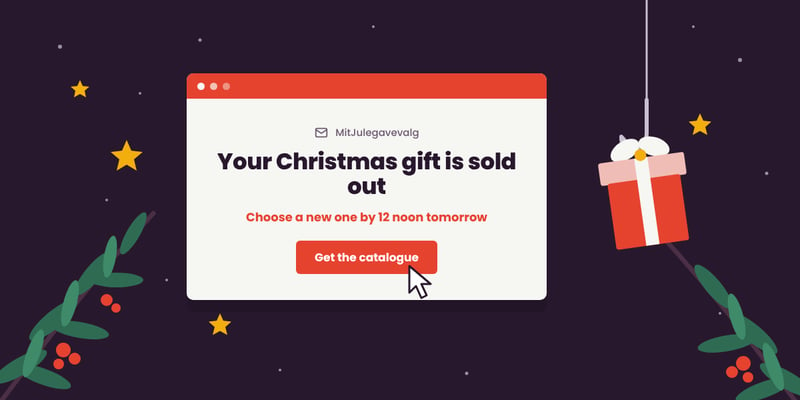
This is "Your Christmas gift is sold out" – one of the two emails from the simulation, sent in Danish. The sender, MitJulegavevalg ("My Christmas Gift Choice"), does not exist.

Simulated phishing email from CyberPilot's Christmas gift campaign, October 2026.
Notice that there is not a single spelling mistake. The warning signs are elsewhere:
- Unknown sender: The domain mitjulegavevalg.com has nothing to do with your workplace or your gift provider.
- Time pressure: You must choose a new gift "by 12 noon tomorrow" to receive it before Christmas.
- Threat of losing out: If you don't order, the money goes to a charity.
- Bait: To make up for it, you can choose a more expensive gift.
- A button instead of a visible link: "Get the catalogue" hides where you are being sent.
- A trustworthy footer: A company registration number, address and phone number look legitimate, but take seconds to make up.
Find more warning signs in 8 tells that show you caught a phishing email.
AI removes the classic warning signs
Many phishing emails used to give themselves away with spelling mistakes and clumsy language. That advice no longer holds. With AI, criminals can write a flawless email in any language in minutes and mimic a well-known company's tone, brand and identity. We tried it ourselves: We asked ChatGPT to write a phishing email – it did.
"A few years ago, a convincing phishing email in Danish took both time and language skills. Today, anyone with access to an AI chatbot can create a credible email in minutes. That's why we have to learn to look for signs other than spelling mistakes – and above all, know when the real email is coming,"
says Benjamin Pomerleau.
Trust has to run from gift provider to employee
Many companies use a gift service. So how do employees know which emails they can trust? Rasmus Degn, founder of the Danish corporate gift provider Gaveportalen, recognises the challenge:
"When employees get an email saying they can choose this year's Christmas gift, it's something most of them look forward to. That's also why it's the kind of email you can easily click without thinking twice."
Gaveportalen asks companies to prepare their employees before login details are sent out. They also offer solutions where employees log in with, for example, their employee number, so no email with a login link is needed at all.
"As a gift provider, I believe we have a responsibility to make choosing your Christmas gift as easy and safe as possible. It's not only about technical security, but just as much about good communication between us, the company and the employees,"
says Rasmus Degn.
Tips for employees
- Wait for word from another channel. Has HR or your manager told you the gift email is on its way? If not, don't click.
- Bypass the link. Use the link from the intranet or from HR instead of the one in the email, unless you are 100% sure the email is genuine.
- Spelling mistakes no longer give anything away. Check the sender's address, and hover over the link to see where it leads before you click.
- Ask before you click. If in doubt, contact HR or IT.
- Watch out for unusual requests. If the email asks for something unusual, such as credit card details, stop and contact IT.
- Clicked and now unsure? Say so. Change your password and contact IT right away.
Tips for companies
- Announce the gift email. HR or management tells employees when to expect an email about Christmas gifts, and who it will come from.
- Confirm the real email. When the genuine gift email arrives, HR or management says so again. Communicate both before and after.
- Make it easy to ask. Tell employees it's better to ask than to click – and make it easy to report a suspicious email.
- Consider avoiding login emails altogether. Some gift portals, such as Gaveportalen, let employees sign in with their employee number.
- Have a plan ready. Agree in advance what employees should do if they have clicked. Use our guide to writing a phishing emergency response plan
Train your employees before the criminals do
The best preparation is having seen the email before – in a safe simulation. With phishing training, we send realistic, seasonal emails like the Christmas gift email, and employees learn from it straight away. Combine it with security awareness training and measure the effect on your security culture.
About the study
- Click rate is the share of recipients who clicked the link. Submit rate is the share who entered details on the fake page.
- The data comes from simulations sent in October 2026 to 62,188 employees.
- No data entered during the simulations was stored.
- The 37% should be compared with CyberPilot's average phishing email, which has a click rate of 12%.